
Christian Worship: Service Builder – Time-Saving Customizations
As one who uses Christian Worship: Service Builder (CW:SB) in a parish setting, I still recall how bulletin production used to go without it. What used to take me half a day now takes me half an hour. I can also recall the reaction at a WELS National Worship Conference nearly a decade ago where a demo of CW:SB was shown on the big screens. There came a point where I clicked “Prepare Bulletin,” the complete order of service appeared, and the collective gasp proved that those in the room relished the thought of having the capabilities such software would provide.
If you’ve been using CW:SB, no doubt you’ve found it very helpful. Still, it’s important to remember that the software is designed with a certain amount of post-export editing that is expected to take place. If you have yet to make use of the program, you can set up a free account and try it out indefinitely. After subscribing, all the export functions become available. In short order, users invariably find that the time saved through use of the program has not been exaggerated. What follows are a couple processes that can shave off a few more minutes for each service that’s planned.
The Equivalent of “Save As”
When choosing “Order of Service” in “Service Plan,” CW:SB displays all of the available orders in the right pane. For our purposes, we’ll focus on the ten settings of The Service. By design, each of those default settings includes nearly everything that is printed in the hymnal pew edition. That’s what makes them default settings. They set the standard of what the WELS Hymnal Project wished to commend to our national church body in the way of orders of service. Recognizing that congregations will almost always have their own local customs, CW:SB makes it easy to customize the default orders of service. That process ultimately concludes with a single click that is the equivalent of the “save as” function.
For example, it may be decided that the words the presiding minister speaks during the distribution or for the dismissal (below) need not be printed in the bulletin for every communion service.

Rather than deleting those several individual items every time they appear in the CW:SB default setting, the user can delete them once and then “save as.” Clicking on the “save” button (graphic, lower right) places a copy of the current order of service into “My Worship Resources / My Liturgies.”

The software will then ask you to name the “saved as” service.
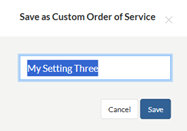
In the future, when clicking on “Order of Service” in the “Service Plan” view, your customized services are available for selection by scrolling to the bottom of the right pane and finding “My Orders of Service.”
Other examples that I have found to be simple, worthwhile adjustments in a customized service are: 1) expanding the caption “Offering” to “Offering / Friendship Registers”; 2) including the brief, fourteen-word close communion announcement after the heading of “The Sacrament.” Both of those are examples that eliminate having to add such text every week in the post-export editing process in MS Word or other programs.
In short, make all your adjustments in a default setting of The Service, click the “Save” button, and select that customized service in the future as needed.
A Look at Further Details
When you click on the gear icon (CW:SB, upper right), navigate to “My Worship Resources / My Liturgies,” and select a custom order of service that you have saved, what you see might not appear in the way you were expecting. In fact, in the CW:SB webinar on customization tools (right at the 46 minute mark), Concordia Publishing House employee Peter Frank sort of chuckles and says that this is the advanced part of the presentation. He then shows a screen that looks like this:
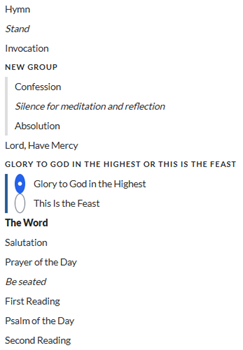
When you open an order of service in “My Worship Resources / My Liturgies,” what you’re looking at is the framework of the order of service. The items with which a liturgy in CW:SB is built fall into these categories:
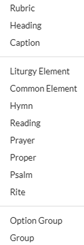
You can be the judge of how advanced this kind of customization really is, i.e., whether or not you will want to learn how it works or make use of it. In “My Worship Resources / My Liturgies,” you can build an order of service from scratch by inserting these various elements into a new order of service and putting in the desired text or music or copyright information as needed. If, however, you are just starting down this road, I would share with you what Mr. Mark Knickelbein (Concordia Publishing House employee) shared with me as I began building all the orders of service that would appear in CW:SB. If you want to learn how these various items actually work, it’s best to “save as” one of the default orders of service and experiment with it. There is a bit of a learning curve to working with these “behind the scenes” items in “My Liturgies.” Some will undoubtedly find the long-term benefits worth the initial investment of time.
Here’s one example of working in the background environment of a CW:SB “My Liturgies” order of service for a fairly simple customization. To accommodate all users, both versions of the Lord’s Prayer needed to be built into the orders of service that include this prayer. It’s the use of an “option group” in the background of the order of service that results in a blue vertical bar in the user’s regular view, affording the option of picking the traditional or contemporary version of the Lord’s Prayer. CW:SB shows the contemporary version as the default option. For this example, let’s say the local custom is to pray the traditional version of the Lord’s Prayer.
It does work to open a default setting of The Service, select the traditional version of the Lord’s Prayer, and “save as.” The custom order of service in “My Worship Resources / My Liturgies” will retain that selection. What I’ll describe is simply a more permanent, cleaner adjustment and is for the sake of demonstrating the process.
Once an order of service has been saved into “My Worship Resources / My Liturgies,” you can open that order of service and make adjustments. Scrolling down to the Lord’s Prayer, the framework looks like this:
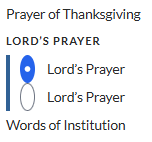
The small caps lettering of LORD’S PRAYER is the option group itself, the default selection Lord’s Prayer is the contemporary version, and the unselected Lord’s Prayer is the traditional version. To remove the contemporary version of the Lord’s Prayer from this custom order of service, the user would click and drag the second (traditional) Lord’s Prayer down, placing it outside the option group and above the Words of Institution. The user would then highlight the contemporary version of the Lord’s Prayer and delete it with the delete button in the right pane, and finally highlight the option group itself, and delete it with the delete button in the right pane. In this example, the result would be one version of the Lord’s Prayer (the traditional) in the custom order of service.

Customizing an order of service is just one of the functions available to users in “My Worship Resources.” Other processes for creating and saving your own materials include the categories in the left column below.

I recently customized all ten settings of The Service, with some of the adjustments referenced above and a few other small details. Now, when planning services weeks and months in advance and selecting those customized orders of service in the “Service Plan” view, not only has making the adjustments netted a small, additional time savings, but it has also eliminated the wondering one often has regarding oft-repeated processes, such as, “Did I paste in the communion announcement?” or “Did I select the version of the Lord’s Prayer that we use?”
This article is really about getting your templates within CW:SB set up the way you want them. It is actually about one facet of establishing templates. Two other key items in the overall process are bulletin format settings and post-export style guides in the final document. Taken together, getting all three right where you want them saves a great deal of time and results in a high-quality end product.
Devote Yourself
Volume 3, Number 1
January 2026
Tags: Worship
Michael Schultz
Rev. Michael Schultz has served WELS congregations in Flagstaff, Ariz., and Lawrenceville, Ga. He chaired the hymns committee for Christian Worship: Supplement and served as project director for the WELS Hymnal Project. He enjoys working on arrangements that combine piano and guitar. Michael currently serves as a parish pastor in Tallahassee, Fla., and is the chairman of the WELS Commission on Worship.
